What Marketing Teams Should Know Before Starting a 3D Animation Project
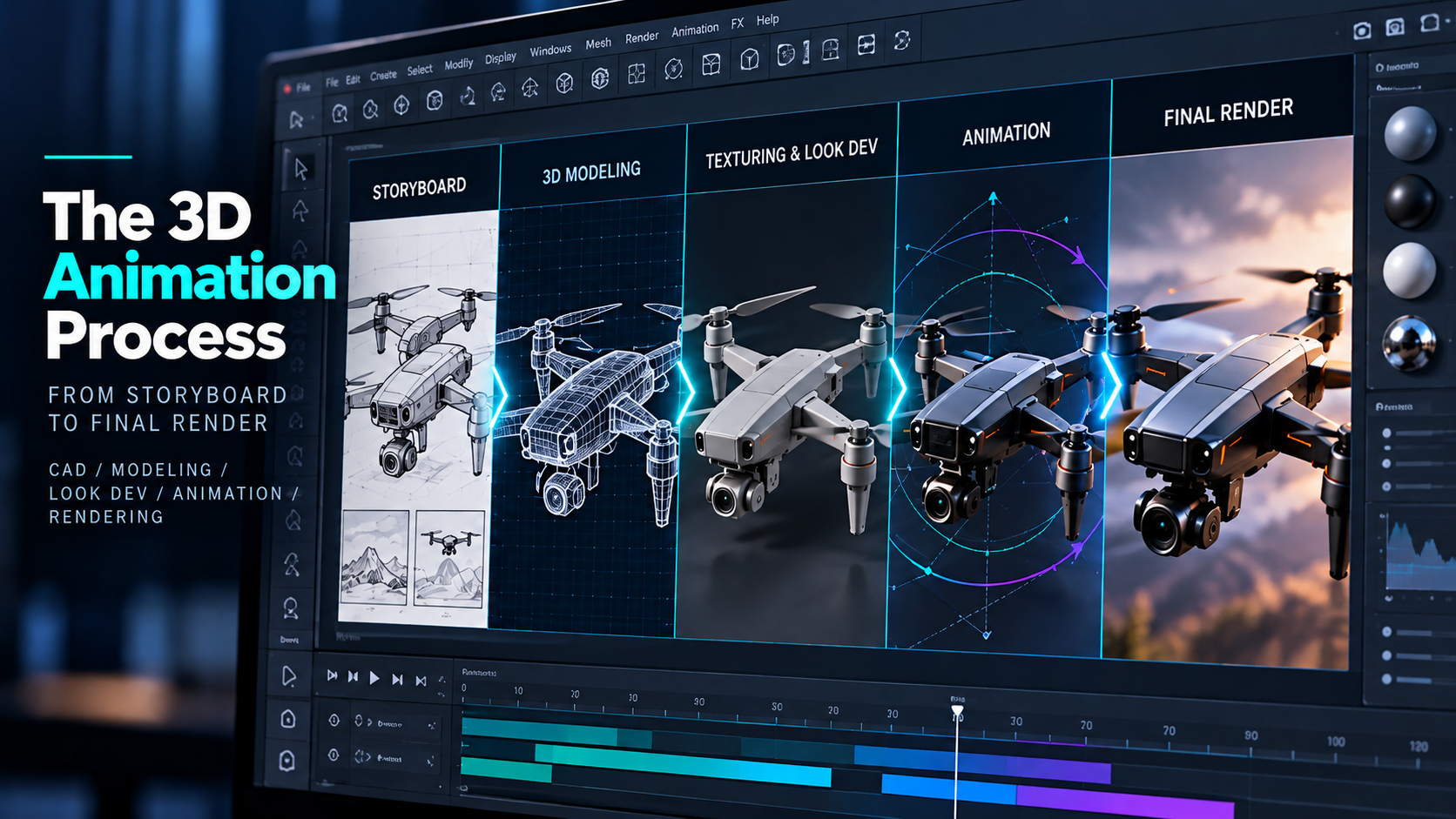
3D Animation Has a Different Production Process
If your team is accustomed to live-action video or traditional design projects, the 3D animation process can feel unfamiliar. One of the biggest differences is that decisions become progressively more expensive to change as production moves forward.
Changing a sentence in a script is simple.
Changing a camera angle in a storyboard is manageable.
Changing an entire sequence after the product has been modeled, animated, textured, lit, and rendered is a very different request.
Understanding the process makes it easier for marketing teams to give the right feedback at the right time.
Phase 1: Discovery
Before anything is animated, the team needs to understand the project.
Who is the audience?
What do they need to understand?
What product are we showing?
What CAD files or technical assets exist?
Which details matter?
Which details can be simplified?
Where will the animation appear?
This is also the time to identify technical reviewers. If engineering, legal, medical experts, product teams, or other subject-matter experts need to approve the work, they should be involved early.
Phase 2: Messaging and Script
3D does not eliminate the need for a strong story.
Before anyone starts rendering beautiful product shots, decide what the video needs to say.
That may include:
- Voiceover
- On-screen copy
- Product benefits
- Technical explanation
- Scene order
- Calls to action
The script gives the animation structure.
Skipping this step because everyone is excited to see the product moving usually creates more revisions later.
Phase 3: Storyboard
The storyboard is one of the most important approval stages.
This is where the team decides:
- Camera angles
- Scene order
- Product position
- Components shown
- Visual comparisons
- Transitions
- Callouts
- Technical sequence
The storyboard does not need to look like the finished animation. Its job is to solve the visual story before expensive work begins. If the marketing team wants a completely different opening concept, this is the time to say it.
Phase 4: Model Preparation
If CAD exists, it needs to be imported and prepared. If CAD does not exist, the product may need to be modeled from drawings, dimensions, photographs, or other references.
Parts may need to be:
Separated.
Cleaned.
Simplified.
Rebuilt.
Organized.
Prepared for movement.
This stage creates the digital foundation for everything that follows.
Phase 5: Look Development
Next, the product begins to look like the real thing.
Materials are added.
Metal becomes metal.
Glass becomes transparent.
Paint reflects light correctly.
Plastic gets the right surface finish.
The team also decides what world the product lives in.
A clean white studio?
A dark premium environment?
A realistic industrial setting?
An abstract technical space?
This is where the overall visual tone becomes clear.
Phase 6: Animation
Now movement begins.
The camera travels.
Components rotate.
Parts separate.
Connections happen.
Mechanical systems move.
Cutaways reveal hidden areas.
At this stage, feedback should focus primarily on movement, timing, and technical accuracy.
For example:
“The connector should rotate before it locks.”
Useful.
“Could we completely change the concept?”
That should have happened during scripting or storyboard review.
Phase 7: Lighting and Rendering
Once the animation is approved, the scene can be rendered at higher quality. Rendering takes the digital information and creates the final imagery. Depending on realism, resolution, and complexity, this can take significant processing time and affect the cost. This is why animation teams frequently use lower-resolution previews during earlier review rounds.
If the movement changes after final rendering begins, the sequence may need to be rendered again and additional budget may be needed.
Phase 8: Compositing and Motion Graphics
The 3D render may still need additional elements.
That can include:
- Titles
- Labels
- Charts
- Callouts
- Interface elements
- Visual effects
- Color adjustments
- Music
- Voiceover
- Sound design
The 3D becomes part of the finished video rather than existing in isolation.
Phase 9: Final Proof
Final review should not be the first time the team asks whether the concept works. By this point, those decisions should already be approved.
Final proof is for things like:
Typos.
Logo use.
Audio balance.
Color.
Captions.
Legal language on-screen.
Export requirements.
The approval process should follow the production process.
Match Feedback to the Stage
A useful rule:
Approve the big decisions while they are still inexpensive to change.
Messaging during scripting.
Composition during storyboarding.
Accuracy during modeling.
Movement during animation previews.
Polish during final review.
That simple discipline can make a 3D project dramatically smoother.
3D Is a Building Process
With live-action editing, the footage already exists. With 3D, the production team is creating the product, environment, materials, lighting, movement, and camera inside a digital world. That is what gives 3D so much flexibility. It is also why planning matters.
At Control Shift Video, we guide marketing teams, engineers, and technical stakeholders through each stage so everyone understands what they are reviewing and what decisions need to be made before the project moves forward.
Ready to Transform Your Video Content
Discover how Control Shift Video can elevate your brand's visual storytelling